
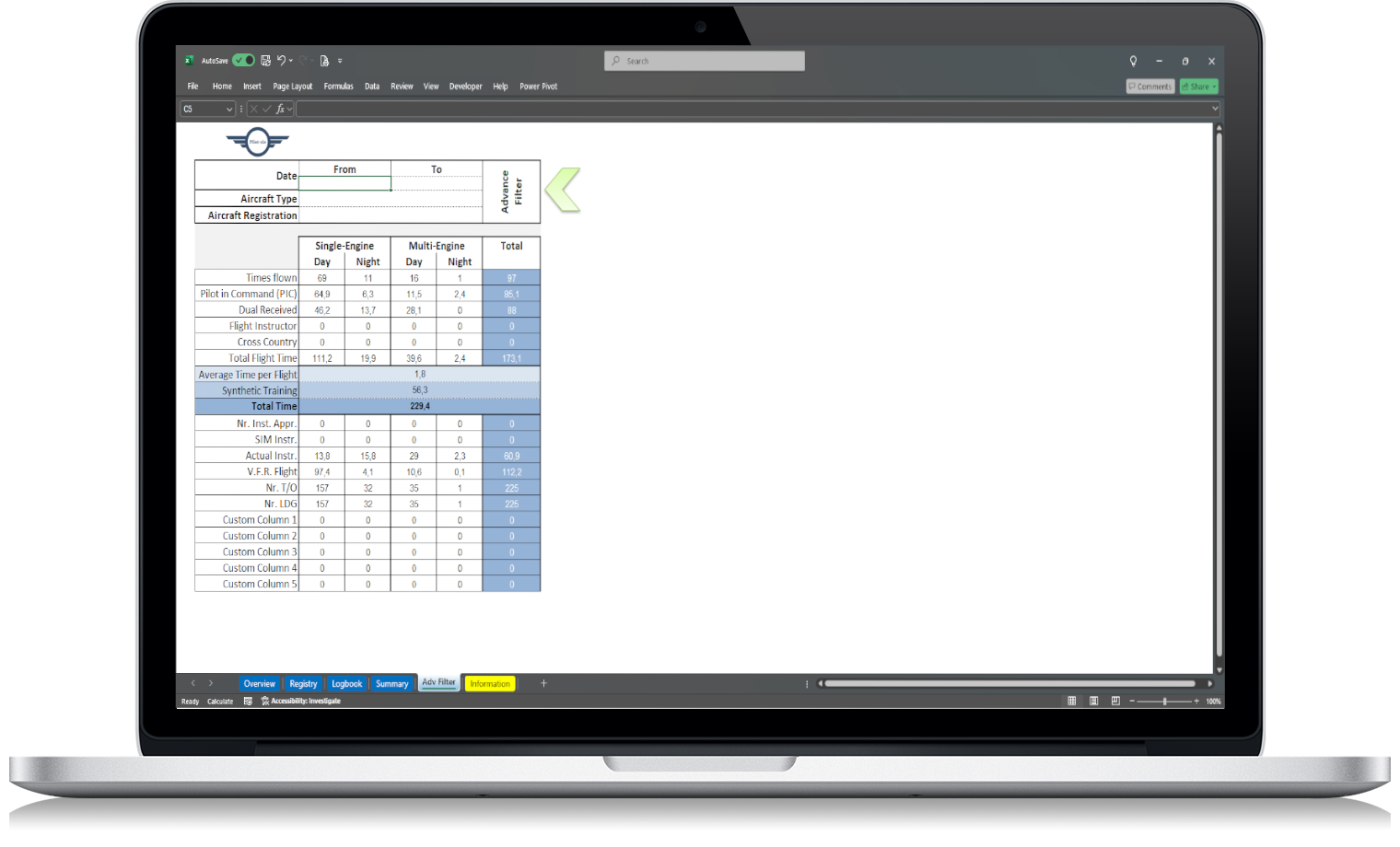
Preparing flight hours for a pilot job application can be stressful if your logbook is not well organized.
Most pilots know their approximate total time. But when an application asks for specific categories, the process can quickly become more difficult.
You may need to provide:
- total flight time
- PIC time
- SIC time
- multi-engine time
- single-engine time
- night time
- instrument time
- cross-country time
- instructor time
- aircraft type experience
- time in the last 12 months
- landings or recent experience details
If your flight records are spread across a paper logbook, notes, apps or different files, preparing accurate totals can take much longer than expected.
That is why a structured pilot logbook is so useful. It helps you turn your flight history into clear, professional summaries.
Why flight hour preparation matters
A pilot job application is not only about your total hours.
Recruiters, operators and flight departments often want to understand the type of experience behind those hours.
For example, two pilots may both have 1,500 total hours, but their experience can be very different.
One pilot may have mostly single-engine training flights.
Another may have significant multi-engine, IFR, night, cross-country or commercial operation experience.
That is why your flight hour breakdown matters.
A clear flight time summary helps show:
- where your experience was built
- which aircraft you have flown
- how much PIC or SIC time you have
- how much night or instrument time you have
- whether your experience fits the role
- how current and organized your records are
A well-prepared summary also gives a more professional impression.
Start with your total flight time
The first number most applications ask for is total flight time.
This should include all properly logged flight time in your pilot logbook.
Before entering this number into an application, review your records carefully. Make sure there are no obvious mistakes, duplicate entries or missing flights.
If you use an Excel pilot logbook, this is usually easier because your total time can be calculated automatically from your flight entries.
Recommended category:
Total Flight Time
This should be one of the first values in your flight hour summary.
Separate PIC and SIC time
After total time, pilot role is one of the most important parts of your flight experience.
Most applications will ask for some version of:
- PIC time
- SIC time
- dual received
- solo time
- instructor time
Do not mix these categories together.
PIC and SIC time should be reviewed separately because they represent different types of experience.
A strong logbook should allow you to quickly calculate:
- total PIC time
- total SIC time
- PIC time by aircraft type
- SIC time by aircraft type
- PIC time in the last 12 months
- SIC time in the last 12 months
This is especially useful for airline, charter, corporate or flight instructor applications.
Organize time by aircraft type
Many pilot job applications ask for aircraft-specific experience.
For example:
- How many hours do you have on C172?
- How many hours do you have on PA28?
- How much multi-engine time do you have?
- How much time do you have on a specific type rating?
- How much time do you have on turbine aircraft?
Even if the application does not ask for every detail, being able to review aircraft type experience is useful.
Your logbook should make it easy to filter or summarize hours by:
- aircraft type
- aircraft registration
- aircraft category
- aircraft class
- type rating, if applicable
This is one of the biggest advantages of using an Excel pilot logbook. You can organize flight time by aircraft type without manually searching through pages of a paper logbook.
Prepare single-engine and multi-engine totals
Many pilot applications separate single-engine and multi-engine time.
For FAA pilots, it is useful to organize aircraft experience by category and class, especially when reviewing airplane single-engine land, airplane multi-engine land, and other aircraft classes.
Common categories may include:
- single-engine time
- multi-engine time
- single-engine PIC
- multi-engine PIC
- single-engine cross-country
- multi-engine cross-country
- single-engine night
- multi-engine night
If your logbook already separates these fields, preparing this section becomes much easier.
If not, you may need to review aircraft types manually and calculate the totals yourself.
Review night time
Night time is another common application field.
Depending on the job, operators may want to know how comfortable you are flying at night or how much night experience you have accumulated.
Your logbook should allow you to calculate:
- total night time
- night PIC time
- night SIC time
- night cross-country time
- night time by aircraft type
If you are using a paper logbook, this can be slow. If you are using Excel, this can usually be calculated with filters or summary formulas.
Recommended category:
Night Time
Review instrument time
Instrument experience is especially important for many pilot roles.
Applications may ask for:
- actual instrument time
- simulated instrument time
- total instrument time
- instrument approaches
- IFR experience
- instrument time by aircraft type
Keep actual and simulated instrument time separate. They are different types of experience and should not be combined without understanding what the application is asking for.
Recommended categories:
- Actual Instrument Time
- Simulated Instrument Time
- Instrument Approaches
A clear logbook makes this section much easier to complete accurately.
Prepare cross-country time
Cross-country time is commonly requested in training, commercial, airline and other pilot applications.
Your logbook should make it easy to review:
- total cross-country time
- PIC cross-country time
- SIC cross-country time
- night cross-country time
- multi-engine cross-country time
Because cross-country definitions may depend on the purpose, pilots should always check which definition applies to the application or requirement they are working with.
From an organization perspective, the important thing is to have a dedicated cross-country field in your logbook.
Recommended category:
Cross-Country Time
Include instructor time if applicable
If you are a flight instructor, your instructor time can be an important part of your experience.
Some applications may ask for:
- flight instructor time
- dual given
- instruction given
- CFI time
- instrument instruction time
- multi-engine instruction time
A logbook designed for long-term use should include a field for instructor time.
Recommended category:
As Flight Instructor
or
Flight Instructor Time
This helps separate your own training received from training you provided to others.
Prepare recent experience totals
Some applications may ask for recent flight experience, such as:
- hours in the last 90 days
- hours in the last 6 months
- hours in the last 12 months
- landings in a recent period
- recent aircraft type experience
This is where Excel becomes especially useful.
Instead of manually checking every page of a paper logbook, you can filter your flight records by date range and calculate recent totals.
Useful summaries include:
- total time in the last 12 months
- PIC time in the last 12 months
- night time in the last 12 months
- instrument time in the last 12 months
- hours by aircraft type in a selected period
These numbers can help you complete applications faster and with more confidence.
Create a flight hour summary table
Before filling in a job application, create a clean flight hour summary.
This helps you avoid mistakes and gives you a reference document.
A simple flight hour summary may include:
| Category | Hours |
|---|---|
| Total Flight Time | |
| PIC Time | |
| SIC Time | |
| Solo Time | |
| Dual Received | |
| Cross-Country Time | |
| Night Time | |
| Actual Instrument Time | |
| Simulated Instrument Time | |
| Multi-Engine Time | |
| Single-Engine Time | |
| Flight Instructor Time |
You can then add more detail depending on the job.
For example:
| Aircraft Type | Total Time | PIC | SIC | Night | Instrument |
|---|---|---|---|---|---|
| C172 | |||||
| PA28 | |||||
| DA40 | |||||
| BE76 |
This kind of summary is useful for applications, CV updates and interviews.
Keep your pilot CV consistent with your logbook
Your pilot CV should match your logbook.
If your CV says you have 850 total hours, but your logbook shows 842.7, that difference may raise questions.
Before sending a job application, check that your CV, application form and logbook totals are aligned.
Review:
- total time
- PIC time
- SIC time
- multi-engine time
- night time
- instrument time
- cross-country time
- aircraft type experience
Small differences can happen because of rounding or update timing, but your records should be consistent and explainable.
Avoid guessing your flight hours
Do not estimate flight hours when preparing a professional application.
Guessing may seem harmless, but it can create problems later.
Instead, calculate your totals directly from your logbook.
If you are missing data or unsure about a category, review the original entries before submitting the application.
An organized digital logbook helps reduce the need for guesswork because the data is already structured.
Be careful with rounding
Different applications may request flight hours in different formats.
Some may accept whole numbers.
Some may ask for one decimal place.
Some may want exact logbook totals.
Use a consistent rounding method and avoid exaggerating.
For example, if your logbook shows 247.6 hours, do not write 250 unless the application specifically allows rounded totals.
Professional flight applications should be accurate, clear and defensible.
Use clear category names
When preparing your flight hour summary, use standard and understandable category names.
Good examples:
- Total Flight Time
- PIC Time
- SIC Time
- Night Time
- Cross-Country Time
- Actual Instrument Time
- Simulated Instrument Time
- Multi-Engine Time
- Single-Engine Time
Avoid unclear labels such as:
- Advanced Time
- Special Time
- Other Time
- Role Time
Clear labels make your application easier to understand.
How an Excel pilot logbook helps with job applications
An Excel pilot logbook can make job application preparation much easier.
Instead of calculating everything manually, a well-built worksheet can help you:
- review total flight time
- calculate PIC and SIC time
- filter by aircraft type
- filter by aircraft registration
- filter by date range
- prepare recent experience totals
- review night and instrument time
- create flight hour summaries
- update your CV faster
- avoid subscription software
This is especially useful if you apply to different operators with different application formats.
One company may ask for total multi-engine time.
Another may ask for multi-engine PIC.
Another may ask for night cross-country.
Another may ask for time on a specific aircraft type.
If your logbook is structured properly, you can get these numbers much faster.
Paper logbook vs Excel for applications
A paper logbook can be valid and useful, but it is not always efficient for applications.
With a paper logbook, you may need to manually review pages, add numbers and check categories.
This can take time and increase the risk of mistakes.
With an Excel pilot logbook, you can organize and calculate your data more easily.
For example, you can filter all flights on a specific aircraft type, calculate total PIC time, or review hours in a selected date range.
That does not mean you must abandon your paper logbook. Some pilots keep both. But for job applications, a digital summary can save a lot of time.
Keep backup copies of your records
Your flight records are part of your career.
Before preparing job applications, make sure your logbook is backed up.
A simple backup system:
- one copy on your computer
- one copy in cloud storage
- one copy on an external drive
If you use an Excel logbook, backup habits are especially important. You control the file, so you should also protect it.
Common mistakes when preparing flight hours
Here are common mistakes pilots should avoid.
1. Mixing total time and PIC time
Total time and PIC time are not the same. Keep them separate.
2. Forgetting SIC time
If you have SIC experience, make sure it is recorded and summarized correctly.
3. Not separating aircraft types
Aircraft-specific experience can be important. Do not leave everything grouped under total time only.
4. Combining actual and simulated instrument time
Keep actual instrument and simulated instrument time separate unless the application clearly asks for a combined value.
5. Using old CV totals
If your CV has not been updated recently, check every number before sending it.
6. Not checking date ranges
If an application asks for time in the last 12 months, do not use total career time by mistake.
7. Rounding too aggressively
Use accurate numbers. Avoid inflating totals.
Flight hour preparation checklist
Before submitting a pilot job application, review this checklist:
- Total flight time calculated
- PIC time calculated
- SIC time calculated
- Solo time reviewed
- Dual received reviewed
- Cross-country time calculated
- Night time calculated
- Actual instrument time calculated
- Simulated instrument time calculated
- Multi-engine time reviewed
- Single-engine time reviewed
- Aircraft type totals prepared
- Recent experience totals checked
- CV totals updated
- Application totals match logbook
- Backup copy saved
This checklist helps reduce errors and makes the application process more organized.
Why your logbook structure matters before you apply
The best time to organize your logbook is before you need it.
If you wait until the day you are filling in an application, you may spend hours trying to calculate totals manually.
A structured logbook gives you a better system.
It allows you to maintain accurate records throughout your career instead of fixing everything at the last minute.
That is why many pilots choose an Excel pilot logbook as their main recordkeeping tool. It gives them a clear structure, automatic calculations and direct control of their data.
Final thoughts
Preparing flight hours for a pilot job application is much easier when your logbook is already organized.
You should be able to review total time, PIC time, SIC time, night time, instrument time, cross-country time and aircraft type experience without starting from zero every time.
A clear flight hour summary helps you complete applications faster, update your pilot CV more accurately and present your experience professionally.
If you want a practical way to organize your FAA-style flight records and prepare flight hour totals without relying on subscription software, our FAA Pilot Logbook in Excel gives you a structured worksheet built to help pilots record, review and manage their flight data in one place.
FAQ
What flight hours are usually needed for a pilot job application?
Most pilot job applications ask for total flight time, PIC time, SIC time, multi-engine time, night time, instrument time, cross-country time and aircraft type experience.
Should my pilot CV match my logbook?
Yes. Your pilot CV, application form and logbook should be consistent. Before applying, review your totals and make sure your numbers match your records.
Can Excel help prepare flight hours for pilot applications?
Yes. An Excel pilot logbook can help calculate totals, filter by aircraft type, review date ranges and prepare clear flight hour summaries.
Should I include actual and simulated instrument time separately?
Yes. Actual instrument time and simulated instrument time should normally be tracked separately because they represent different types of instrument experience.
How often should I update my flight hour summary?
You should update your flight hour summary regularly, especially before sending a CV, applying for a job or completing an aviation application form.
Is a digital pilot logbook useful for job applications?
Yes. A digital pilot logbook makes it easier to calculate totals, prepare summaries and review your flight experience by category, aircraft type and date range.