
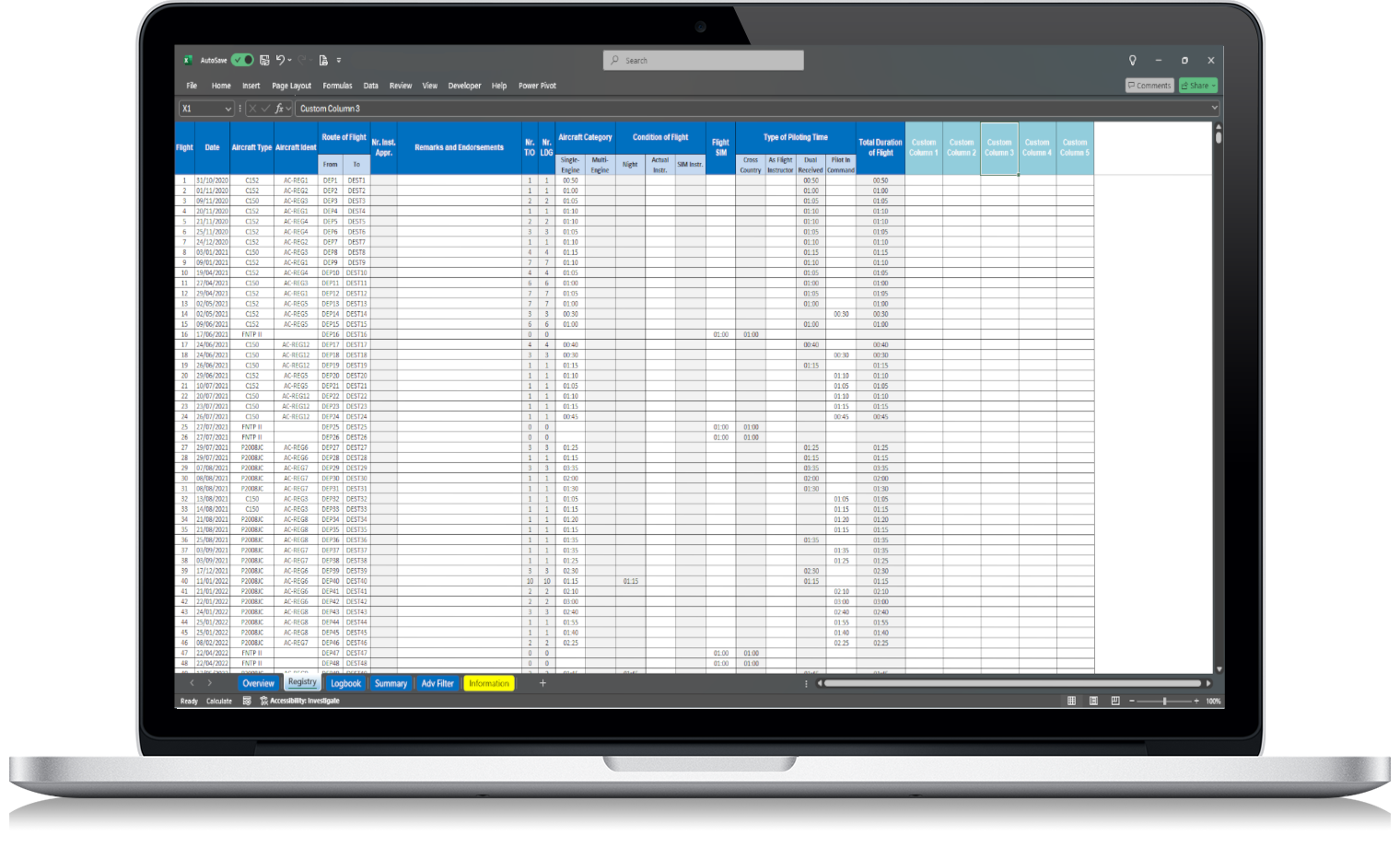
A pilot logbook is more than a record of total flight hours. It is a structured history of your aviation experience, training, aircraft flown, flight conditions and pilot roles.
For FAA pilots, keeping clear and complete records is especially important because logbook entries may be used to show aeronautical experience for certificates, ratings, flight reviews and other FAA-related requirements. Under 14 CFR §61.51, pilots must document certain training and aeronautical experience in a manner acceptable to the Administrator. The regulation also describes the basic information normally included in logbook entries, such as date, total flight time or lesson time, departure and arrival locations, and aircraft type and identification.
That is why choosing the right FAA pilot logbook fields matters.
A good logbook should help you answer questions like:
- How much total flight time do I have?
- How much PIC time have I logged?
- How much SIC time do I have?
- How many hours do I have on a specific aircraft type?
- How much night, cross-country or instrument time have I recorded?
- Can I quickly prepare my flight totals for a job application?
If your logbook is not structured properly, answering these questions can become slow and frustrating.
Why FAA pilot logbook fields matter
Many pilots start with a simple physical logbook. At the beginning, that may be enough. But as flight experience grows, so does the need for better organization.
A pilot with 50 hours may only need basic entries. A pilot with 500, 1,500 or 5,000 hours usually needs more detailed summaries.
The right fields make it easier to:
- track flight time accurately
- separate PIC, SIC, solo and dual received time
- review aircraft-specific experience
- prepare totals for job applications
- monitor night, cross-country and instrument experience
- keep records easier to review later
- avoid mixing different types of flight time
This is one of the main reasons many pilots move from paper records to an FAA pilot logbook in Excel. A spreadsheet allows the pilot to record flights in a structured format and review totals more quickly.
Essential fields in an FAA pilot logbook
A practical FAA pilot logbook should include the fields pilots usually need to record, review and summarize their flight experience.
Not every field will apply to every flight. However, having a complete structure gives you more flexibility as your aviation experience grows.
1. Date of flight
The date is one of the most basic and important fields in a pilot logbook.
It allows you to organize flights chronologically, filter records by period and review your experience over time.
Examples:
2026-01-12
2026-02-03
2026-03-21
A consistent date format is important, especially in Excel. If you use different formats, filtering and calculations can become less reliable.
Recommended field name:
Date
2. Aircraft type
The aircraft type field records the type or model of aircraft flown.
Examples:
C172
PA28
DA40
SR22
BE76
This field is important because pilots often need to know how much time they have on a specific aircraft type. It is also useful when preparing summaries for training, insurance, rental checkouts, job applications or personal recordkeeping.
Recommended field name:
Aircraft Type
3. Aircraft identification
For FAA-style records, the aircraft identification field is important. In most cases, this means the aircraft registration or tail number.
Examples:
N123AB
N456CD
N789EF
Under 14 CFR §61.51, aircraft type and identification are part of the general information associated with logbook entries when logging flight time or lesson time.
Recommended field name:
Aircraft Identification
or
Aircraft Registration
For an FAA product, Aircraft Identification is a strong label because it matches the regulatory wording more closely.
4. Route of flight
Your logbook should include the departure and arrival locations.
Examples:
KJFK to KBOS
KLAX to KSAN
KAPA to KCOS
This helps document where the flight took place and makes it easier to review route history later.
Recommended field names:
From
To
or
Departure
Arrival
For a clean Excel layout, “From” and “To” are usually shorter and easier to use.
5. Total flight time
Total flight time is the foundation of the pilot logbook.
It is the number most pilots think about first, but it should not be the only value tracked.
Recommended field name:
Total Flight Time
or
Total Duration of Flight
A good Excel pilot logbook should calculate total hours automatically, but the raw flight entry should still be clear and easy to check.
6. Pilot in Command time
PIC time is one of the most important categories in any pilot logbook.
Depending on your certificate, rating, flight operation and role during the flight, you may be able to log pilot in command time under FAA rules. Because PIC time can be important for training, ratings, experience requirements and employment, it should be separated from total time.
Recommended field name:
PIC
or
Pilot in Command
For clarity, “Pilot in Command” is better in a professional logbook, while “PIC” is useful for compact columns.
7. Second in Command time
SIC time should also have its own field.
This is especially important for pilots flying aircraft or operations where more than one pilot is required. 14 CFR §61.51 includes rules for logging second in command time, so it should not be mixed with PIC or total time.
Recommended field name:
SIC
or
Second in Command
8. Solo time
Solo time is especially relevant for student pilots and training records.
It should be tracked separately because it represents a specific type of pilot experience. Mixing solo time with other categories can make your records less clear.
Recommended field name:
Solo
9. Dual received
Dual received means flight training received from an authorized instructor.
This is an important field for pilots in training, pilots working toward a certificate or rating, and pilots who need to keep clear records of instruction received.
Recommended field name:
Dual Received
or
Flight Training Received
10. Flight instructor time
Flight instructors often need to track time given as an instructor.
If your FAA pilot logbook is designed for a wide range of pilots, including CFIs, it should include a field for instructor time.
Recommended field name:
As Flight Instructor
or
Flight Instructor Time
11. Cross-country time
Cross-country time is important for training, certificates, ratings and experience summaries.
Because cross-country definitions can vary depending on the FAA requirement being considered, the logbook should provide a clear place to record it, while the pilot remains responsible for logging it correctly for the applicable purpose.
Recommended field name:
Cross-Country
12. Night time
Night time should be recorded separately from total time.
Pilots often need to review night experience for training, currency, applications or personal monitoring. A clear night time field makes this much easier.
Recommended field name:
Night
or
Night Time
13. Actual instrument time
Actual instrument time should be recorded when applicable.
Under FAA rules, a person may log instrument time only for the time during which the person operates the aircraft solely by reference to instruments under actual or simulated instrument flight conditions.
Recommended field name:
Actual Instrument
or
Actual Instr.
14. Simulated instrument time
Simulated instrument time should be separated from actual instrument time.
This is important because actual and simulated instrument time are not the same thing, even though both may be relevant to training and experience records.
Recommended field name:
Simulated Instrument
or
Sim Instr.
15. Instrument approaches
If the pilot performs instrument approaches, it is useful to have a dedicated field for them.
This can help with reviewing instrument experience and preparing summaries.
Recommended field name:
Instrument Approaches
or
Nr. Inst. Appr.
For a product aimed at international buyers, the full label Instrument Approaches is clearer.
16. Landings
Landings are useful for reviewing flight activity, recent experience and operational history.
A basic logbook may include one landing column. A more detailed logbook may separate:
- day landings
- night landings
- full-stop night landings
For a simple FAA pilot logbook, a general landing field can still be useful. If you want to support more detailed recent experience reviews, separate landing categories are better.
Recommended field names:
Landings
or
Day Landings
Night Landings
17. Takeoffs
Many logbooks track landings but forget takeoffs.
For pilots who want a clearer recent experience overview, takeoffs are also useful.
Recommended field name:
Takeoffs
or
Nr. T/O
For clarity, “Takeoffs” is better than an abbreviation.
18. Simulator or training device time
If the logbook supports simulator or training device records, it should include a dedicated field.
14 CFR §61.51 includes references to flight simulators, flight training devices and aviation training devices when relevant to the logbook entry.
Recommended field names:
- Flight Simulator
- Training Device
- Device Type
19. Remarks and endorsements
The remarks section is one of the most flexible parts of the pilot logbook.
It can be used for:
- training notes
- lesson details
- instructor comments
- safety pilot information
- flight review references
- checkride preparation notes
- endorsement references
- operational notes
Recommended field name:
Remarks and Endorsements
This is a strong label because it gives pilots space for both normal comments and training-related references.
20. Medical certificate and pilot certificate tracking
These fields are not part of a normal per-flight entry, but they are useful in a complete pilot logbook workbook.
A separate summary or pilot information section can include:
- pilot certificate
- certificate number
- ratings
- medical certificate class
- medical certificate expiry date
- flight review date
- instrument proficiency check date, if applicable
These fields help pilots keep important personal aviation information in one place.
Recommended section name:
- Pilot Information
or
- Certificates and Validity
FAA pilot logbook fields checklist
Here is a clean checklist of fields that a practical FAA pilot logbook should include:
- Date
- Aircraft Type
- Aircraft Identification
- From
- To
- Total Flight Time
- PIC
- SIC
- Solo
- Dual Received
- As Flight Instructor
- Cross-Country
- Night
- Actual Instrument
- Simulated Instrument
- Instrument Approaches
- Takeoffs
- Landings
- Flight Simulator or Training Device
- Remarks and Endorsements
For a more advanced version, you may also include:
- Aircraft Category
- Aircraft Class
- Day Takeoffs
- Night Takeoffs
- Day Landings
- Night Landings
- Night Landings Full Stop
- Safety Pilot
- Device Type
- Medical Certificate
- Pilot Certificate
- Ratings
- Flight Review Date
FAA pilot logbook fields in Excel
An Excel pilot logbook works best when each field has a clear purpose.
The goal is not to add as many columns as possible. The goal is to organize the information pilots actually need.
A good Excel layout should be:
- easy to read
- easy to filter
- easy to update
- consistent across all entries
- structured for automatic calculations
- clear enough for long-term use
This is where Excel can be more practical than a paper logbook. Once your fields are organized, you can calculate totals by date range, aircraft type, registration, pilot role and flight condition.
For example, you can quickly review:
- total time this year
- PIC time in the last 12 months
- night time by aircraft type
- instrument time by date range
- hours on a specific registration
- cross-country totals
- landings by period
This makes an Excel FAA pilot logbook especially useful for pilots who want control over their own records without paying for subscription software.
Common mistakes when choosing pilot logbook fields
Choosing the wrong fields can make your logbook harder to use later.
Here are some mistakes to avoid.
Using vague field names
Avoid unclear labels such as:
- Time
- Role
- Aircraft
- Notes
Use specific labels instead:
- Total Flight Time
- PIC
- SIC
- Aircraft Type
- Aircraft Identification
- Remarks and Endorsements
Clear field names make the logbook easier to understand and reduce the risk of entering data in the wrong place.
Mixing PIC and SIC time
PIC and SIC time should not be combined into one generic pilot time column.
They represent different types of pilot experience and should be tracked separately.
Forgetting aircraft identification
Aircraft type alone is not enough.
If you only write “C172” but do not include the aircraft identification, you lose the ability to review time on a specific aircraft.
Not separating actual and simulated instrument time
Actual instrument and simulated instrument time should have separate fields.
This makes your records more accurate and easier to review.
Not keeping entries consistent
Consistency matters.
For example, if you write the same aircraft type in several different ways, your Excel filters and summaries may not work properly.
Avoid mixing:
- C172
- C-172
- Cessna 172
- Cessna 172S
Choose one format and keep using it.
Should an FAA pilot logbook be paper or digital?
FAA pilot logbook records can be kept in a digital format if they allow the pilot to maintain the required information properly. The FAA has also issued guidance on electronic recordkeeping and electronic signatures in Advisory Circular 120-78B, although advisory circulars are guidance and are not regulations by themselves.
For many pilots, a digital logbook in Excel is a practical option because it combines structure, calculations and direct access to the file.
Paper logbooks are simple and traditional, but they are harder to search and summarize. Subscription apps can be powerful, but they often create ongoing cost and platform dependency.
An Excel pilot logbook offers a middle ground:
- digital organization
- no monthly fee
- direct file access
- easy backups
- customizable structure
- automatic totals
- simple export and review
How many fields should a pilot logbook have?
A pilot logbook should have enough fields to record your experience clearly, but not so many that it becomes difficult to use.
For most pilots, the best approach is:
- essential fields for every flight
- optional fields for specific cases
- summary fields for totals and analytics
- separate sections for certificate and medical information
Too few fields create missing data.
Too many fields create confusion.
The ideal FAA pilot logbook is structured, complete and still easy to update after each flight.
Using an Excel FAA pilot logbook template
A well-built Excel pilot logbook template saves time because the structure is already prepared.
Instead of creating columns, formulas and summaries from zero, you can start entering flights immediately.
A good template should help you:
- record flight details clearly
- track total flight time
- separate PIC, SIC, solo and dual received time
- review night, cross-country and instrument time
- organize flights by aircraft type and registration
- prepare flight hour summaries
- keep your data in your own file
- avoid subscription software
For pilots who want a simple, organized and independent way to manage their records, an FAA Pilot Logbook in Excel can be a practical solution.
Final thoughts
The fields in your pilot logbook determine how useful your records will be in the future.
A good FAA pilot logbook should not only record total hours. It should help you understand your experience by aircraft, route, role, condition and time category.
At minimum, your logbook should include date, aircraft type, aircraft identification, route, total flight time, pilot role, flight conditions and remarks. For better long-term use, it should also include PIC, SIC, solo, dual received, cross-country, night, actual instrument, simulated instrument, approaches, takeoffs and landings.
If you want to keep your FAA-style flight records organized without relying on subscription software, our Excel FAA Pilot Logbook gives you a structured worksheet designed to help pilots record, review and manage their flight data in one place.
FAQ
What are the most important FAA pilot logbook fields?
The most important fields include date, aircraft type, aircraft identification, route, total flight time, PIC, SIC, solo, dual received, cross-country, night, actual instrument, simulated instrument, landings and remarks.
Does an FAA pilot logbook need aircraft identification?
Yes. Aircraft type and identification are part of the general logbook entry information described under 14 CFR §61.51 when logging flight time or lesson time.
Should PIC and SIC time be separate?
Yes. PIC and SIC time should be recorded separately because they represent different types of pilot experience.
Can I keep FAA pilot logbook fields in Excel?
Yes. Excel can be used to organize FAA-style pilot logbook fields, calculate totals, filter data and keep records under your own control.
Should I track actual and simulated instrument time separately?
Yes. Actual instrument time and simulated instrument time should be separate because they are different types of instrument experience.
Is a paper logbook better than an Excel logbook?
A paper logbook is simple and traditional, but an Excel logbook is usually easier for calculations, filtering, summaries and backups.